GitX for beautiful Git on Mac OS X
10 Jul 2009 - Singapore
Before I begin this post, let me warn you that I’m a very poor power-user of my tools. So if this post has a high-school-girl’s-giddy-excitement ring to something which has been blindingly obvious to everybody, please excuse me.
I’ve been using GitX to look at commits to Wego.com projects for a few months now and I always wished that it had a command-line option to launch it (similar to Textmate’s mate command). I like GitX’s clean interface, search functionality and the fact that it’s open source.
But today I realized that GitX did have a command-line tool that you can use to launch it from your Git repo. It can be enabled like so:
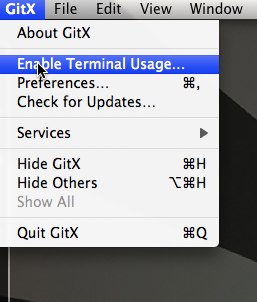
What this does is that it copies the executable gitx to /usr/local/bin.
Some of the other useful commands that I’ve started to use (more examples can be seen at the user manual):
If you think some of the options look familiar, you’re right. GitX accepts command-line arguments which you normally provide to git log and git diff.
Happy GitXing!